Quickstart - Department Head
You're a T2 role with read-only access across everything. Department heads (Gaffer, Key Grip, Sound Mixer, Wardrobe, HMU, etc.) need awareness of the production state but don't make writes inside Grace day-to-day - your work happens on the floor or in your own tools.
What you can do here is keep current on what's happening, what's coming, and what crew/cast are on call.
What you see
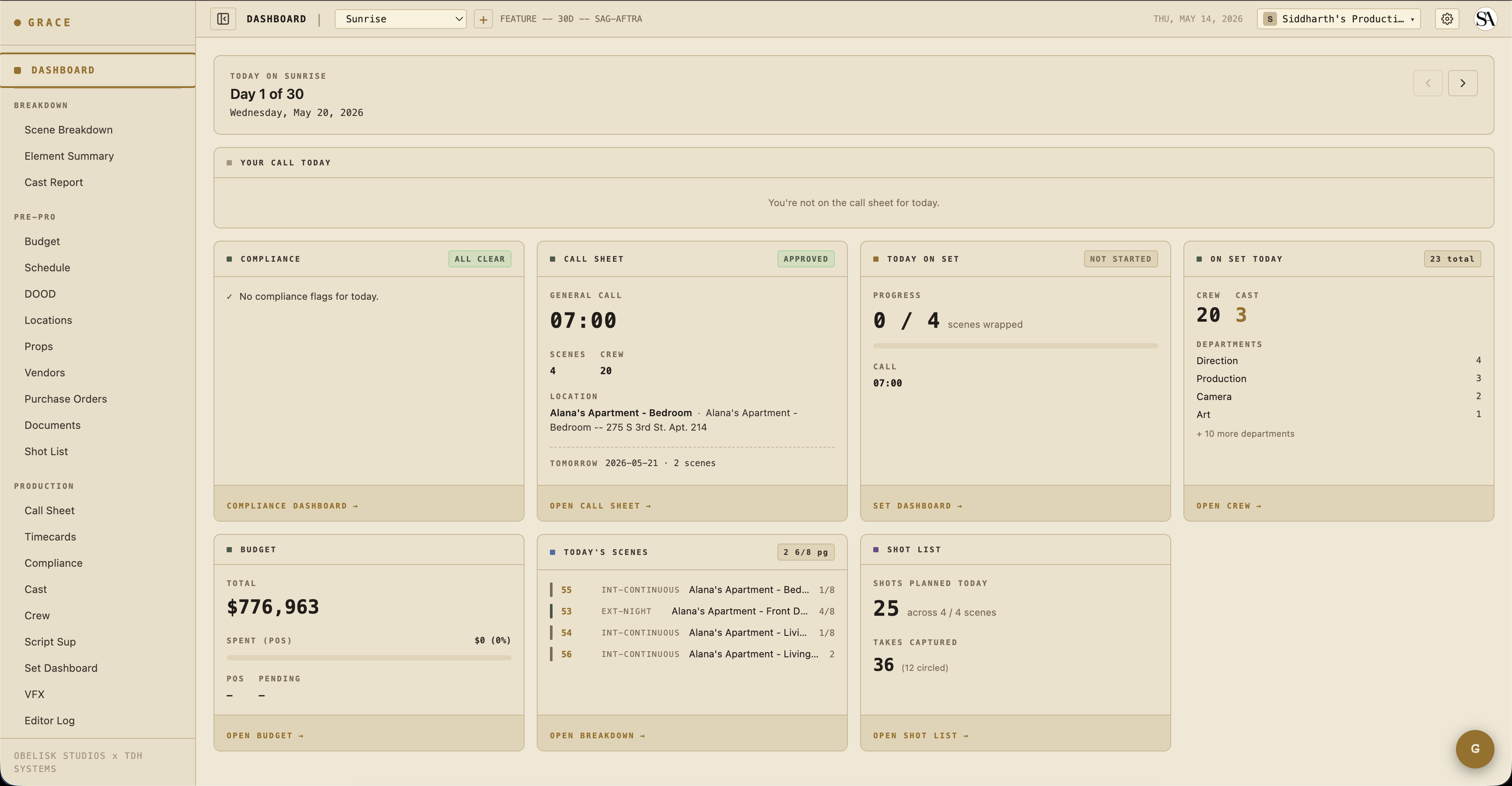
Open the per-production dashboard at /dashboard/production for the show you're working on. Your view has:
- Day Header + Your Call Today - what you're called at, where the location is.
- Today's Scenes - what's being shot, page counts, time of day.
- Today on Set - live status of the strip timeline.
- Crew/Cast on Set - who's working today, by department.
Grace teaches itself in-product. The first time you open a page, a short spotlight walkthrough highlights what's on it. You can replay any page's walkthrough from the gear menu at the top right under Show guide. There's also the Grace Co-Pilot chat panel, which only ever reads the sections you have access to, so it's a safe way to ask things like "what am I called at tomorrow?" or "what scenes are up today?".
What you do day-to-day
Mostly: check the call sheet the night before to confirm your call time, scenes, and dept notes. Then check the set dashboard mid-day if you're curious about how the day is running.
For your specific department:
- Sound Mixer - open On-Set → Set Dashboard during the day to see live strip status. (Sound-specific tools like wireless frequency planning aren't in Grace yet - they're on the roadmap.)
- Wardrobe / HMU - Coverage → Script Sup shows continuity notes per element. Your dept's notes are tagged with the capturing department (HMU, Wardrobe, etc.).
- Gaffer / Key Grip - same set dashboard view. Lighting plans aren't in Grace yet either.
- Locations / Transport - Schedule & Locations → Locations for addresses, hospital, parking.
You can also view Roster → Documents read-only: your own deal memo, NDAs, and anything else shared with the production. Sending a document out for signature or generating one from a template is a producer (T1) action, not something you do here.
What you can write to
By default, T2 dept heads have read-only access across every section they can see, and Budget, crew/cast rates, and the Vault are hidden entirely. The Producer can grant per-section write overrides if you need them. For example, "Wardrobe HoD needs to edit character looks" → the Producer grants a Scenes = write override on your crew row (character looks live under the Scenes section). See Access control.
Creative refs are the exception. By default you can view and upload creative refs (Creative Prep → Creative) for every department, not just your own. The Producer can narrow this per-department if needed. See the creative refs section.
What you can't do
- Edit the schedule, call sheet, budget, or crew roster - those are owned by UPM / 1st AD / producer.
- Invite or remove people - that's the producer.
If you need access you don't have, ping the producer or AD and they can override or invite you with broader permissions.
Next reads
- Per-production dashboard - what every card means.
- Access control - what your tier sees by default and how overrides work.