Compliance documents
Grace turns compliance paperwork into one-click PDFs. There are 8 standard document types, and all of them are generate-on-demand from the compliance dashboard. You pick the document you need for a given shoot day, Grace builds a formatted draft, and you either print it and collect ink signatures or route it out for e-signature via Documenso. When the signed copy comes back the document flips to executed.
Nothing on the compliance dashboard fires by itself. Two related things do run automatically when you approve a call sheet, but neither is one of these 8 PDFs: Grace auto-drafts a Forced Call memo when the turnaround against the previous day's wrap is short, and it logs any meal-penalty cost to the budget's meal-penalty line for that day. Everything else here you click GENERATE for.
The first time you open Compliance, Grace's in-app spotlight tour walks you through the GENERATE buttons and the e-sign flow. Replay it any time from the gear menu's Show guide.
The compliance dashboard
Dashboard -> Compliance. It shows every compliance document for the production, laid out as GENERATE buttons grouped by shoot day.
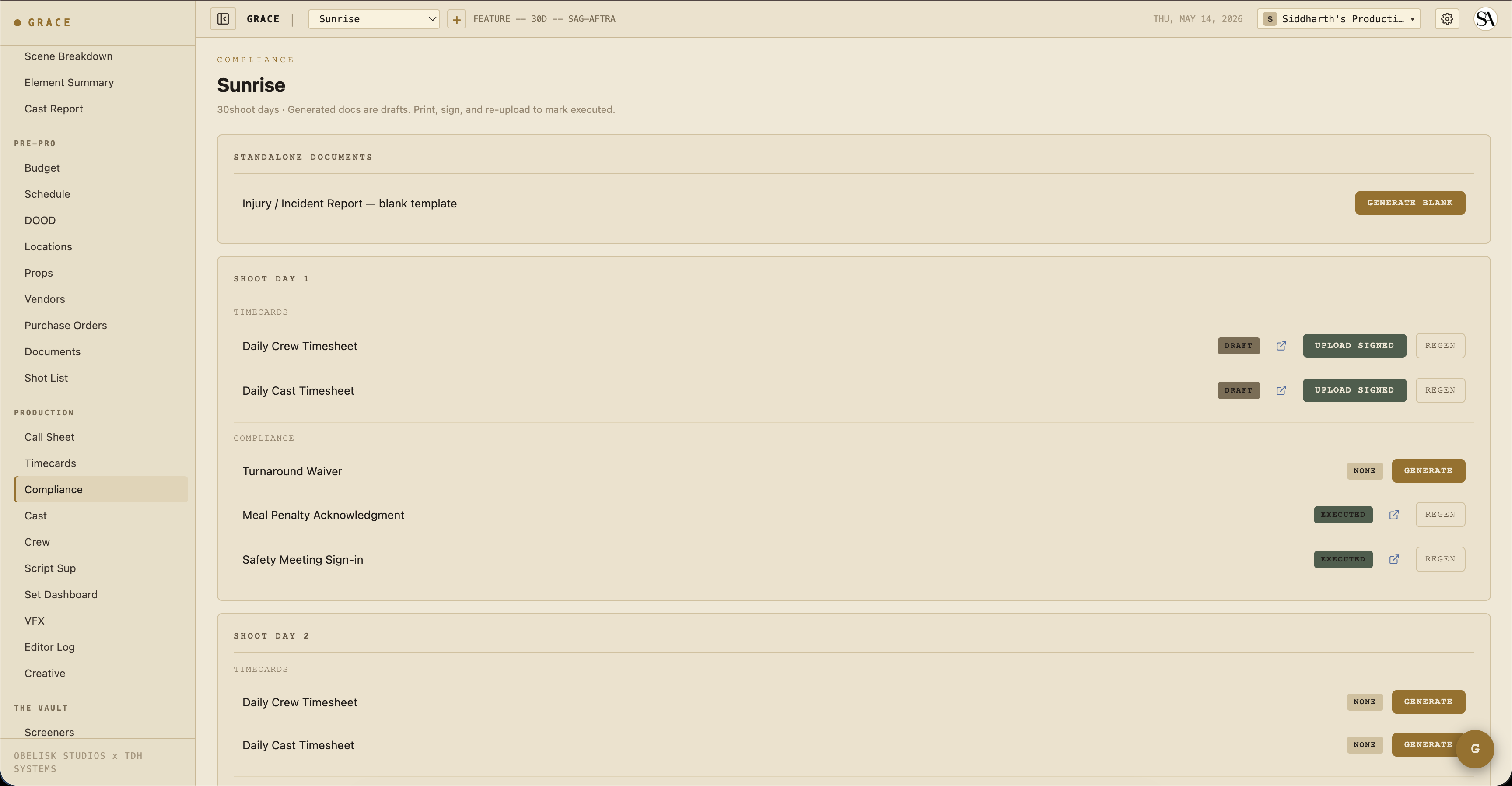
The page is organized into three parts:
- Standalone documents - the blank Injury / Incident Report template, built with GENERATE BLANK (not tied to a day).
- Per shoot day - each day carries a TIMECARDS block (Daily Crew Timesheet, Daily Cast Timesheet) and a COMPLIANCE block (Turnaround Waiver, Meal Penalty Acknowledgment, Safety Meeting Sign-in, and the Studio Teacher Daily Report when minors are on call that day).
- Exhibit G (one per minor) - inside a day's section, one Exhibit G line appears for each minor cast member on call that day.
Row actions
Each document line carries a status badge plus the actions that apply to its current state:
- Status badge -
none/draft/pending signature/executed/expired/superseded, color-coded (grey draft, gold pending signature, green executed). - GENERATE - build the draft PDF (shown when the status is
none). The injury template's button reads GENERATE BLANK. - Open (external-link icon) - view the current PDF in a new tab.
- SEND FOR SIGNATURE - route a
draftout for e-signature via Documenso (T1 roles only, see below). - UPLOAD SIGNED - replace the draft with the physically-signed copy, which flips the status to
executed. - REGEN - rebuild the draft from the latest data (shown once a draft exists).
When a document is out for signature (pending signature), the row also shows a live signer-progress readout, a refresh button that syncs status from Documenso, and a REMIND button that nudges anyone who has not signed yet.
Lifecycle
Every compliance document goes through:
- Draft - initial state. Grace generated it; nobody signed yet.
- Pending signature - sent out for e-signature via Documenso. The row tracks per-signer progress until everyone signs.
- Executed - fully signed. Either every signer completed the Documenso flow, or the AD uploaded a physically-signed copy back. The draft stays on file for audit; the executed version replaces the live copy on the row.
- Expired / Superseded - for documents with effective/expiration dates.
E-signature (Documenso)
E-signature is live. Any draft compliance document can be routed for signature instead of ink-on-paper, on Documenso, Grace's self-hosted signing service.
Click SEND FOR SIGNATURE on a draft to open the in-app signature composer. You see the real PDF and place fields (signature, date, name, initials, or a free-text box) exactly where they belong, then assign each field to a recipient from the cast/crew roster. Sending routes the document through Documenso and moves it to pending signature; recipients get an email with a signing link. Back on the dashboard you can refresh the signer status or hit REMIND for anyone still outstanding. When everyone signs, a Documenso webhook flips the document to executed automatically.
The same rail powers uploaded deal memos and contracts, and the in-app Generate feature for the eight standard forms (crew and cast deal memos, cast talent release, NDA, and the location, appearance, personal, and crowd releases). An executed deal memo flips its roster row and that person's budget line green.
Sending is limited to T1 roles (owner, producer, UPM). And to be clear: Grace never signs for you. It only collects real signatures from the people you assign, and paper is always a fallback (print, sign, UPLOAD SIGNED).
The 8 types
1. Exhibit G
The SAG-AFTRA Minor's Daily Time Sheet. Grace generates one Exhibit G per minor cast member per shoot day (the line only appears for cast flagged as minors on that day's call). Adult cast hours live on the Daily Cast Timesheet, not on Exhibit G.
Contents:
- Minor's name, guardian name + phone
- Character name, contract type
- Day length (call to wrap)
- School hours, set hours, rest and meal periods (studio teacher fields)
- Total day length (capped per the union profile / CA Education Code by age)
- Studio teacher and parent/guardian signature lines
2. Turnaround Waiver
Generated on demand for a day where crew or cast waived their rest period. Affected roles (anyone scheduled both days) are listed with the gap shortfall. Note: approving a call sheet with a short turnaround separately auto-drafts a Forced Call memo, which is a distinct document from this waiver.
Contents:
- Yesterday's wrap time
- Today's earliest call time
- Gap (e.g., 9.5h)
- Required minimum (12h for IATSE)
- Shortfall (2.5h)
- Per-role list of who's affected
- Signature lines
3. Meal Penalty Acknowledgment
Generated on demand to record penalty units accrued on a day and which cast and crew were affected.
Contents:
- Day's general call
- First meal time (planned)
- Actual meal start (from timecards or marker)
- Minutes past threshold
- Penalty units accrued (= floor(minutes / 30))
- Per-role list + signature lines
Separately, approving a call sheet logs the penalty cost to the budget's meal-penalty line for that day. That budget cascade is automatic; generating this acknowledgment PDF is not.
4. Studio Teacher Report
The Studio Teacher Daily Report, offered per day when minor cast are on the call sheet. Generated on demand.
Contents:
- Minor's name, age, character
- School hours (3h required for K-12)
- Set hours
- Rest periods
- Meal break time
- Total day length (capped per CA Education Code by age)
- Studio teacher signature line
5. Injury Report
A standalone blank template. Use the compliance dashboard's GENERATE BLANK button in the Standalone Documents section.
Contents:
- Incident time + location
- Who was involved
- Department(s) affected
- Description of incident
- Medical action taken
- Witnesses
- 1st AD + medic sign-off
A richer in-app form for incident data entry is on the roadmap; today the generator uses a shell template.
6. Safety Meeting Sign-In
Generated on demand per day. This is separate from the Set Dashboard's MARK MEETING DONE control, which only writes a shared "meeting done" marker that everyone on the production sees. Generate this PDF when you need a physical sign-in sheet.
Contents:
- Date + shoot day
- Hazards covered (stunts / SFX / weapons / animals / etc. from today's elements)
- Attendee sign-in lines (manual fill on print)
7. Daily Crew Timesheet
Generated on demand per shoot day from the day's timecard entries.
Contents:
- Per-crew row: name, dept, role, contract type
- Times: in / meal out / meal in / 2nd meal out / 2nd meal in / wrap
- Hours worked + OT
- Initials (bold for overrides, italic grey for Grace prefills)
- Meal penalty footer if applicable
8. Daily Cast Timesheet
Same as crew but for cast with the longer flow:
- Arrived / makeup in / on set / meal out / meal in / wrap / dismissed
- Meals / Penalty / Violations count
- Character name + work day type (Work / Travel / Hold / Rehearsal)
Format conventions
All PDFs share consistent chrome:
- Header - "GRACE PRODUCTION OS" wordmark, the document title, and the production title + day/date subtitle.
- Body - type-specific content.
- Footer - a "Generated by Grace Production OS" line with the generation date.
Signature blocks are tabular: role / name / signature line.
Print convention: PDFs always render on a white background, which matches the app's default light theme (and stays white even when the app is set to the Espresso dark theme).
Day-bucketing on the compliance dashboard
The compliance dashboard groups documents by shoot day from the document title (e.g., "Exhibit G - Day 3"). Keep the day number in the title and the grouping will keep working.
On the roadmap
- Auto-generate on approve - having the Exhibit G and Turnaround Waiver drafts appear automatically when a call sheet is approved (today you click GENERATE per day).
- Per-jurisdiction Minor Work Permits - each US state has different forms (CA EC, NY DOL, GA Labor, etc.). Requires per-state legal review before templating.
- SAG-specific compliance variants - Low Budget exemptions, Ultra Low Budget hour tolerances, Short Project Agreement variants. Tied to the production-size field.
Related
- Compliance workflow - the AD's daily compliance cycle, including the compliance profiles and minor-hours gate.
- Timecards reference - the data feeding into the timesheet PDFs.