Access control & role tiers
Grace's permission system is built around three principles:
- Tiered access - three numeric tiers (T1 / T2 / T3) plus a singleton owner.
- Role narrowing within tier - each role inside a tier has a default permission profile narrower than the tier ceiling.
- Per-section overrides - producers can grant additional permissions per crew member, never exceeding the tier ceiling.
This page is the full matrix. For the simpler "what does my role see?" answer, see the quickstarts.
The first time you open Settings -> Access, an in-app tour walks you through the invite, customize, and unlink actions on the real screen. You can replay it any time from the gear menu ("Show guide"). This written reference is the companion for the full detail.
The tiers
| Tier | Roles | Notes |
|---|---|---|
| Owner | (singleton per org) | Created when the org was created. Always full access. Locked for life - no transfer. |
| T1 | Producer, UPM, Tier-1 (other) | Full access to everything. Producers run the production. |
| T2 | Director, AD, DP, Script Sup, VFX Sup, Camera Op, Department Head, Tier-2 (other) | Curated permissions per role. Default narrower than T1. |
| T3 | Crew, Cast, Cast Minor, Cast Guardian, Tier-3 (other) | Minimal - see your own call info + today's scenes. Nothing else by default. |
The cast variants (Cast, Cast Minor, Cast Guardian) are derived automatically from the cast roster - minors are flagged with a checkbox, guardians point at their crew row.
Sections
There are 19 named sections in the access matrix. Each has one of four levels: None / Read / Write / Full (cumulative - Write implies Read, Full implies Write).
| Section | What it gates |
|---|---|
| Scenes | Scene breakdown view + edit |
| Schedule | Strip schedule + DOOD |
| Call Sheets | Call sheet build, approve, send |
| Crew | Crew roster view + edit |
| Crew Rates | Crew rate column (commercially sensitive) |
| Cast | Cast roster |
| Cast Rates | Cast rate column |
| Cast Contact | Cast contact info (phone, email) |
| Locations | Locations master |
| Shots | Shot list |
| Budget | Budget tree + POs |
| Scene Timing | Per-scene shoot/prep minutes |
| VFX Dashboard | VFX flagging dashboard |
| Script Sup Dashboard | Script Sup workflow page |
| Editor Log | Editor log + exports |
| Vault Screeners | Vault screener delivery |
| Vault Dailies | Vault dailies |
| Vault DIT | DIT pipeline |
| Screener Sharing | Granting screener share access |
During the free open beta, every organization runs at Studio-equivalent access, so all four Vault sections are available to everyone. The plan gating described below (a STUDIO pill in the sidebar and an upgrade modal) is dormant during the beta and returns when paid plans are reintroduced.
Tier baseline
The starting point per tier (before role narrowing):
- T1 - Full on everything.
- T2 - Full on most sections, but Crew Rates and Cast Rates are None by default (commercially sensitive), and the Budget section is also None by default. Budget access is T1 / owner only unless a producer grants it via an override. The Crew Rates / Cast Rates gate hides the rate columns on the crew and cast rosters, which is separate from the Budget section.
- T3 - Everything None by default.
Role narrowing
Each T2 role narrows its tier baseline:
- Director - Vault sections set to None by default (producer grants via overrides).
- AD - Same as Director, plus full call-sheet-write access retained.
- DP - Narrower: Scenes / Schedule / Cast / Locations read-only, Crew writeable, Cast Contact / Vault hidden. Shots stays full.
- Script Sup - Heavily narrowed: Scenes / Crew / Cast hidden, Shots writeable, Script Sup Dashboard full, Editor Log read.
- VFX Sup - Similar to Script Sup but with VFX Dashboard full and Script Sup Dashboard hidden.
- Camera Op - Most aggressive narrowing: Shots writeable; everything else hidden.
- Department Head - All Read except rates (hidden). Generic dept head can see everything but write to nothing.
- Tier-2 (other) - T2 baseline with Vault narrowed to None.
T3 has minimal narrowing. Cast variants get Scenes (read) so they can see today's scenes.
Per-section overrides
A producer can grant additional permissions per crew member at Settings → Access → CUSTOMIZE.
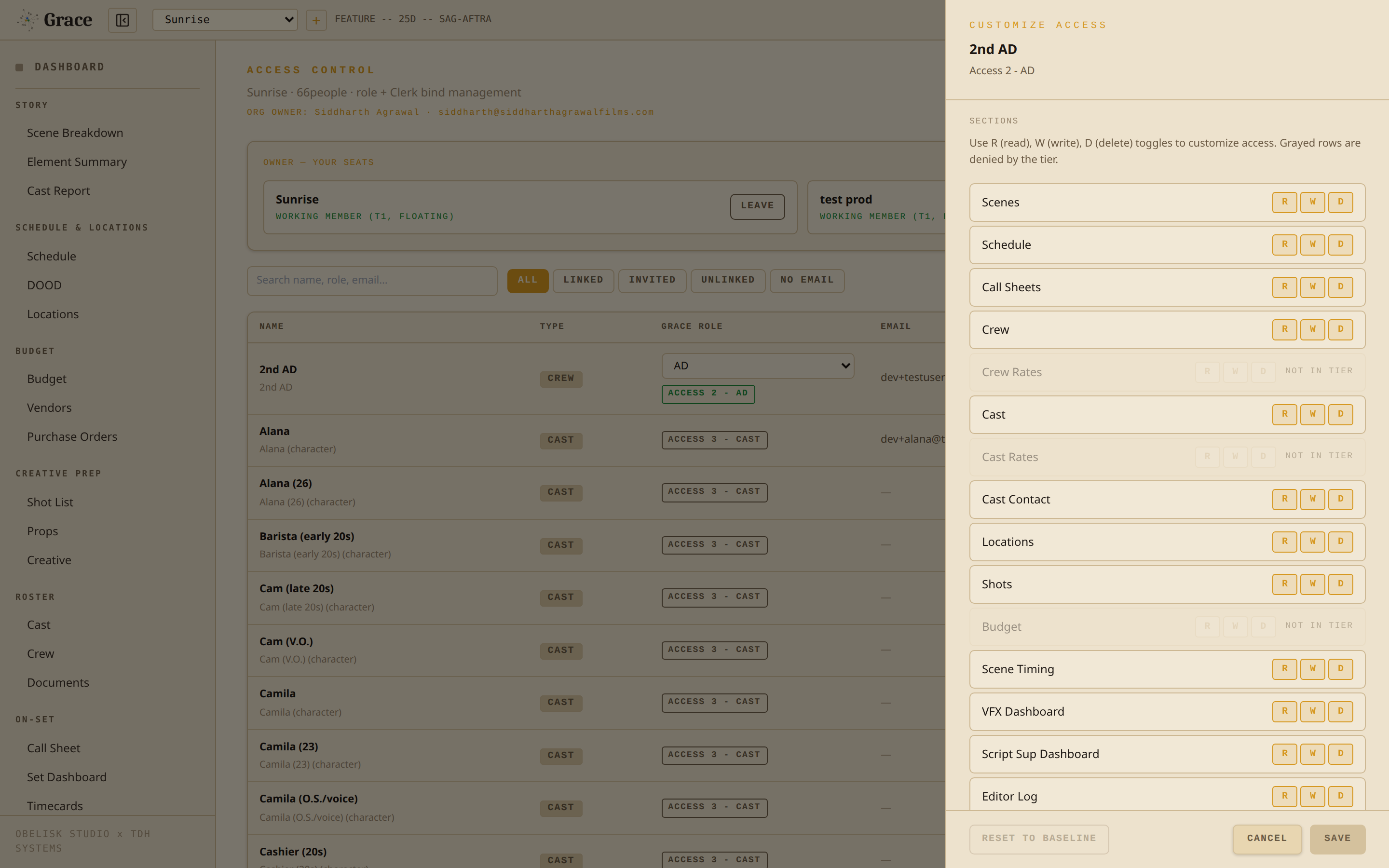
- For T1 / T2 roles, overrides can widen past role narrowing but never exceed the tier ceiling. E.g., a T2 DP can be granted Vault Screeners (Read) (above narrowing) but not Crew Rates (Full) (above T2 ceiling).
- For T3, overrides can only narrow (downward).
Creative overrides
A separate per-department override gates creative asset access (mood boards, frame refs, references). T1 always has full. T2 baseline is full but narrowable per department. T3 capped at Read on their own department, hidden elsewhere.
How a permission is resolved
When you (or your code) request access to a section, Grace runs through this resolution chain:
- Org owner check - are you the owner of this organization? If yes:
- You have a seat on this production → full access.
- You don't have a seat → read-only access. A gold banner ("JOIN AS PRODUCER") self-joins you onto the production to upgrade to full. Archiving a production is owner-only.
- Crew match - your account is bound to a crew row on this production → your Grace role + any overrides determine access.
- Cast match - your account is bound to a cast row → Cast or Cast Minor based on the cast row's minor flag.
- Cast guardian - you're listed as the guardian for a cast minor → Cast Guardian role applies.
- No match - denied.
Then:
- Plan clamp - if your org is on Standard, the four Vault sections are hidden. Owner status is preserved so the upgrade modal still appears. (Dormant during the free beta, where every org resolves to Studio-equivalent access. Returns at GA.)
- Production state clamp - if the production is archived or locked, all writes drop to read. (This clamp applies during the beta too.)
- Lapsed subscription clamp - if the subscription has lapsed past the grace window, everything drops to read. (Does not apply during the free beta, since no subscription is required to enter. Returns at GA.)
Studio-only sections
When paid plans return at GA, the four Vault sections (Screeners, Dailies, DIT, Screener Sharing) will be gated to the Studio plan: on Standard plan they will appear in the sidebar with a STUDIO pill, and clicking will open the upgrade modal instead of navigating.
During the free open beta this gate is dormant. Every organization runs at Studio-equivalent access, so all four Vault sections are available to everyone and no STUDIO pill or upgrade modal is shown. The plan gate returns when paid plans are reintroduced at GA.
Invite + accept flow
Per-production invites send a magic-link email with a 14-day expiry. Acceptance:
- Verifies your email matches the invited email.
- Binds your account to the crew or cast row.
- Seats you on this production. (During the free beta seats are unlimited. The bundled-versus-floating seat-pool model, which depends on plan and add-ons, applies once paid plans return at GA.)
- Adds you to the organization so your name shows up in the switcher.
If you already have a Grace account in this organization, the invite auto-accepts without sending the email - you're added directly with a confirmation banner.
Unlinking
A producer can unlink any crew or cast member. This removes their access to the production immediately. If they have no other roles in the organization, they're also removed from the org entirely.
The org owner can't be unlinked from their own organization - they'd lose access to billing.
Default access matrix at a glance
For a quick reference of "what does role X see by default":
| Section | Owner | T1 | AD | Director | DP | Script Sup | VFX Sup | Cam Op | Dept Head | Crew | Cast |
|---|---|---|---|---|---|---|---|---|---|---|---|
| Scenes | full | full | full | full | read | - | - | - | read | - | read |
| Schedule | full | full | full | full | read | read | read | - | read | - | - |
| Call Sheets | full | full | full | full | - | - | - | - | read | - | - |
| Crew | full | full | full | full | write | - | - | - | read | - | - |
| Crew Rates | full | full | - | - | - | - | - | - | - | - | - |
| Cast | full | full | full | full | read | - | - | - | read | - | - |
| Cast Rates | full | full | - | - | - | - | - | - | - | - | - |
| Cast Contact | full | full | full | full | - | - | - | - | read | - | - |
| Locations | full | full | full | full | read | - | - | - | read | - | - |
| Shots | full | full | full | full | full | write | write | write | read | - | - |
| Budget | full | full | - | - | - | - | - | - | - | - | - |
| Scene Timing | full | full | full | full | full | read | read | - | read | - | - |
| VFX Dashboard | full | full | full | full | read | - | full | - | read | - | - |
| Script Sup Dashboard | full | full | full | full | read | full | - | - | read | - | - |
| Editor Log | full | full | full | full | read | read | read | - | read | - | - |
| Vault (4 sections) | full | full | - | - | - | - | - | - | - | - | - |
(Vault is Studio-only, hidden for Standard orgs. During the free beta every org runs at Studio-equivalent access, so Vault is available to owner and T1.)
Related
- Quickstarts - per-role 2-minute reads.
- Billing & seats - how plans, lapsing, and overrides interact.