Billing & seats
Grace is completely free during the open beta. There is no billing to manage: no plans, no seats to buy, no credit card, and no charges. Every feature is included. This page describes both the free beta reality (top) and the paid model that returns at general availability (bottom, clearly labeled).
The free beta
Since the open beta went live, every org runs on the house. Under the hood Grace treats each beta org as if it were on the top (Studio) tier, and the seat, production-slot, and over-quota machinery is switched off. You will never be asked for a card, and nothing renews or lapses.
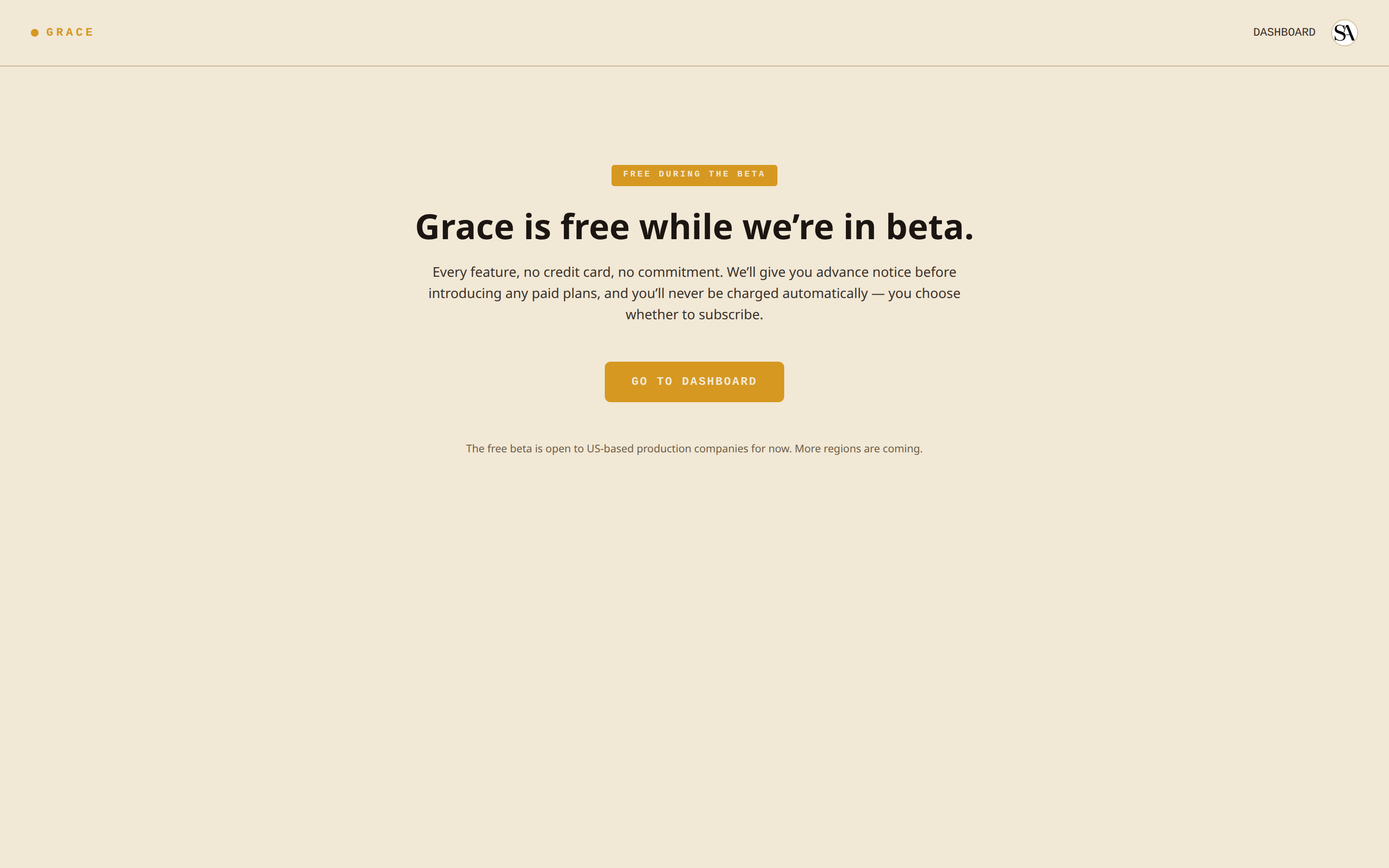
What you actually see:
/pricing- a single "FREE DURING THE BETA" card. No prices, no plan cards, no checkout. Just a SIGN UP FREE call to action (GO TO DASHBOARD if you're already signed in).- Settings -> Billing and Settings -> Billing -> Plan - a gold-bordered "FREE BETA" card: "You're on the free beta. Every feature is included, free, with no card on file... There's nothing to manage here for now."
Why there's no card
Signup is US-only for now. At org creation you self-attest that you're a US-based individual or company (a soft IP-geo check is logged but does not block VPN users). Because there is no paid step in the flow, no card is ever collected. Non-US signups are routed to a waitlist instead of the dashboard.
What still has limits in the beta
Quotas are lifted, with two deliberate exceptions:
- Storage still counts against the org's pool. Uploaded video (screeners, dailies, creative assets) is real object-storage cost, so it is not bypassed. See the STORAGE USAGE card on Settings -> Billing.
- AI script parsing is rate-limited to 15 parses per hour per org, so the lifted production-slot cap can't be turned into an unbounded parse bill.
What happens at GA
When paid plans return at general availability, we'll give at least 60 days notice and you will affirmatively choose whether to subscribe. You'll never be charged automatically at the flip. Founders (a handful of 100%-off lifetime subscriptions) are unaffected either way, and are the only orgs that see the paid billing dashboard today.
What billing will look like at GA
Everything below describes the paid model that is switched off during the free beta. None of it is user-facing for a beta org. It is documented here so the model is transparent, and because founder / subscribed orgs already see the dashboard shown here.
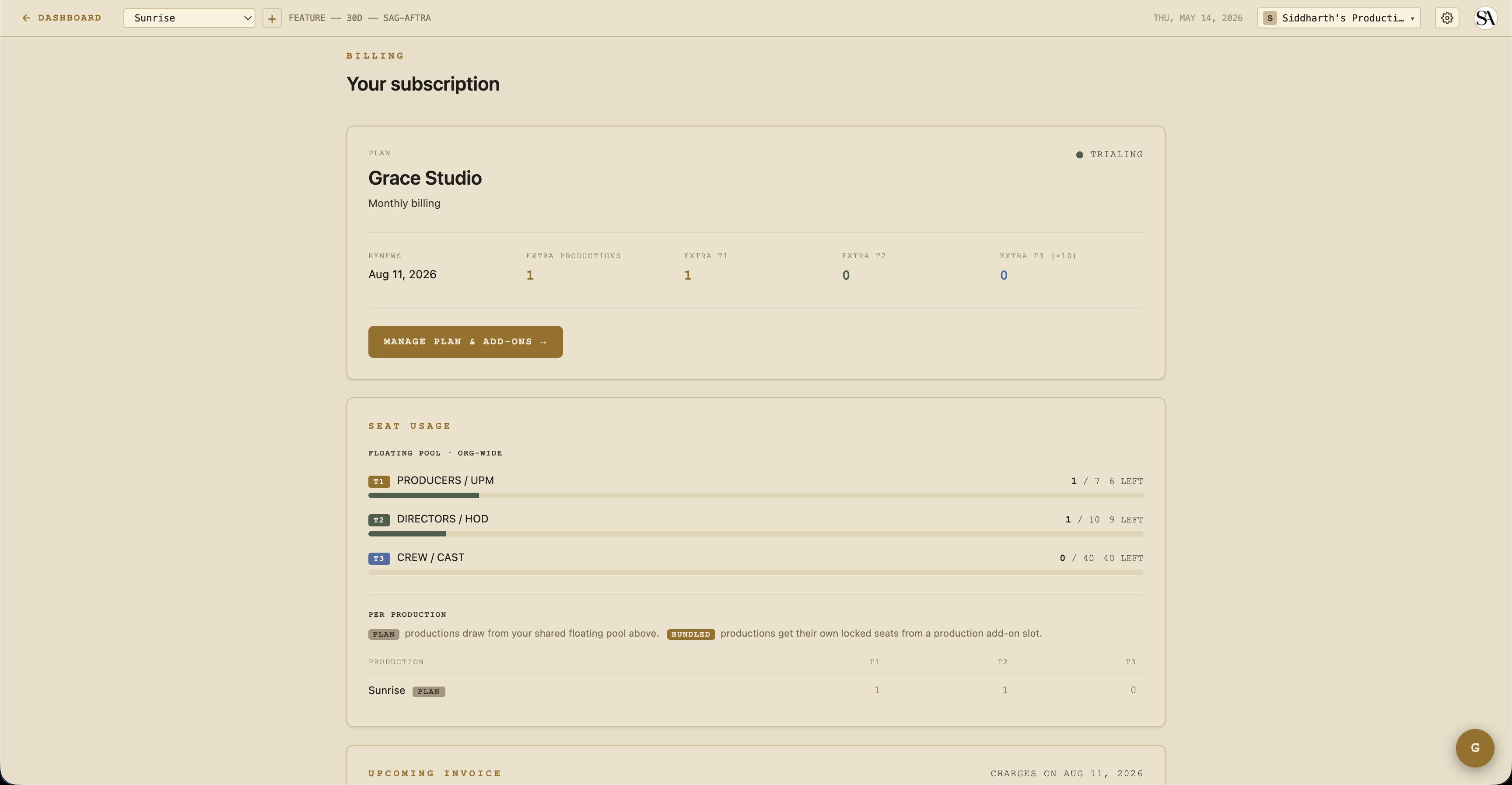
Three things to know about the paid model:
- One subscription per organization, not per production.
- Two plans, Standard or Studio, with seat-pack and production-slot add-ons.
- Lapse, archive, and over-quota states, automated and surfaced in banners.
Plans
| Standard | Studio | |
|---|---|---|
| Productions included | 1 | 1 |
| T1 floating seats | 3 | 6 |
| T2 floating seats | 5 | 10 |
| T3 floating seats | 20 | 40 |
| Vault (screeners / dailies / DIT) | not included | included |
| AI script parse | included | included |
| Compliance auto-generate | included | included |
Prices are not shown during the beta and are set at GA. The Vault is the main feature gate. Without it, Standard customers see the four Vault sections in the sidebar with a STUDIO pill that opens an upgrade modal on click. (During the beta every org is treated as Studio, so the Vault is available to all.)
Add-ons
Beyond the included production slot and seats, you can add:
- Production slot pack - +1 production slot. Comes with a bundled-seat pool of 2 T1 + 3 T2 + 10 T3 seats scoped to that production. Use case: launching a new show.
- T1 seat pack - +1 floating T1 seat, usable across any production in the org.
- T2 seat pack - +1 floating T2 seat.
- T3 seat pack - +1 pack = 10 T3 seats (10x multiplier,
t3SeatAddonUnitsx 10).
At GA, add-ons are mid-cycle subscription items and Stripe charges the card on file with prorated billing. During the beta there are no add-ons, because quotas are lifted.
Seat counting
When someone is invited to a production, they consume a seat from the org's seat pool. The pool is the sum of:
- Floating - included with the plan plus floating seat-pack add-ons. Usable on any production.
- Bundled - included with a production-slot add-on, tied to that specific production.
When you invite someone, Grace decides which pool they draw from: bundled first (if the production is bound to a slot and bundled capacity exists), then floating.
If a member is in the bundled pool of a production and that production gets archived, they flip to the floating pool automatically (consuming a floating seat instead).
The over-quota state
Grace surfaces an OVER QUOTA banner when the org has more demand than capacity:
- Tier overflow - e.g. 7 T1 seats consumed but only 6 in the pool. Shows on a red banner with "ADD CAPACITY" and "REVIEW SEATS" buttons.
- Bindings overflow - more bound productions than add-ons paid for. E.g. 3 production slots in use but only 2 paid for. Triggers a 7-day to 30-day countdown.
The bindings overflow countdown
When you have more bound productions than add-ons:
- Day 0 - overflow detected. Banner: "Oldest bound production locks in 7 days."
- Day 7 - auto-lock. The oldest bound production becomes read-only (members keep access but can't write). Banner: "Locked production archives in 23 days."
- Day 30 - auto-archive. The locked production is archived, its slot frees up, and bundled members flip to the floating pool.
You can resubscribe before day 7 to clear the countdown. The lock is removed automatically when capacity catches up.
Production state machine
Each production has two states independent of its creative status:
- Locked - read-only freeze. Members still consume seats. Triggered by auto-overquota (countdown) or manual owner action.
- Archived - read-only, members excluded from seat counting, slot freed. Triggered manually or by auto-archive after 30 days locked.
Both states are reversible. Unarchive or unlock from the production card.
When unarchiving, Grace re-checks seat capacity. If unarchive would result in overflow, you get a clear error showing the exact deficit per tier.
Lapsed billing state
Three statuses matter here, in order:
- Active / trialing - normal. Full access.
- Canceled / unpaid / payment failed - entered a 7-day grace period.
- Lapsed past grace - all sections org-wide drop to read-only. Owner status is preserved so they can resubscribe.
The 7-day grace window is generous, to handle "my card expired and I need to update it" without immediately locking the AD out mid-shoot. (Note: a beta org has no subscription, so lapse, grace, and read-only clamping never apply during the free beta.)
Banner colors:
- Gold (warning) during grace - app stays writable, banner shows the grace expiry date.
- Orange (action required) past grace - writes blocked everywhere.
- The over-quota banner takes priority if both fire, since over-quota is the more immediate issue.
Cancellation flow
Two ways to cancel:
Native cancel (recommended). From Settings -> Billing -> CANCEL SUBSCRIPTION. You keep paid access through the current period. At period end, the org transitions to canceled status and enters the 7-day grace. You can resume any time before period-end by clicking RESUME SUBSCRIPTION.
Customer Portal. For more advanced changes (some add-on quantity adjustments not in the native UI) the Customer Portal lives on Stripe's hosted page, reachable from Settings -> Billing.
(A beta org has no subscription to cancel; Settings -> Billing shows the FREE BETA card instead.)
Plan switching
Native flow at Settings -> Billing -> Plan. Click a plan card, then confirm in the modal showing the proration preview. Changes apply with prorated billing.
Cycle switching (monthly to annual and back) also swaps every add-on item to the matching cycle so you don't end up with a mixed-cycle subscription.
Add-on purchase / removal
From Settings -> Billing -> MANAGE PLAN & ADD-ONS. Click ADD on a seat-pack or production-slot card, confirm proration in the modal, done.
Removal is more nuanced, because removing a production slot when bound productions exist would create overflow. The modal handles this:
- Preview shows which productions would need to be archived.
- Pick the production(s) to archive via a checkbox picker.
- Confirm. Grace archives them in one step before reducing the slot count.
Invoice history
Settings -> Billing shows the 12 most recent invoices with both a hosted-page link (to see retries and payment status on Stripe) and a direct PDF download.
Owner-only writes
Every billing action is owner-only. Non-owners on a subless org pass through to whatever access they actually have (they're not gated by a missing subscription, that's the owner's problem to fix). See Access control.
Stripe status
Stripe is live (since 2026-05-20) on the account behind us.graceproductionos.com, with the full product and price catalog in live mode. It is simply not surfaced to users during the free beta. Automated billing and receipt email is sent from @graceproductionos.com.
Related
- Access control - how plans and lapses clamp the access matrix.