Compliance
Grace turns compliance paperwork into one-click PDFs. From the compliance dashboard you generate the document you need for a given shoot day, print it, collect physical signatures (or send it out for e-signature), and upload the executed copy back. The lifecycle is paper-first: Grace builds a draft, you get real signatures, you upload the executed copy to mark it done.
Two things run on their own when you approve a call sheet: Grace auto-drafts a Forced Call memo if the turnaround against the previous day's wrap is short, and it logs any meal-penalty cost to the budget's meal-penalty line for that day. Everything else on the compliance dashboard is generate-on-demand.
The compliance dashboard
Dashboard -> Compliance. Shows every compliance document for the production, laid out as a set of GENERATE buttons grouped by shoot day.
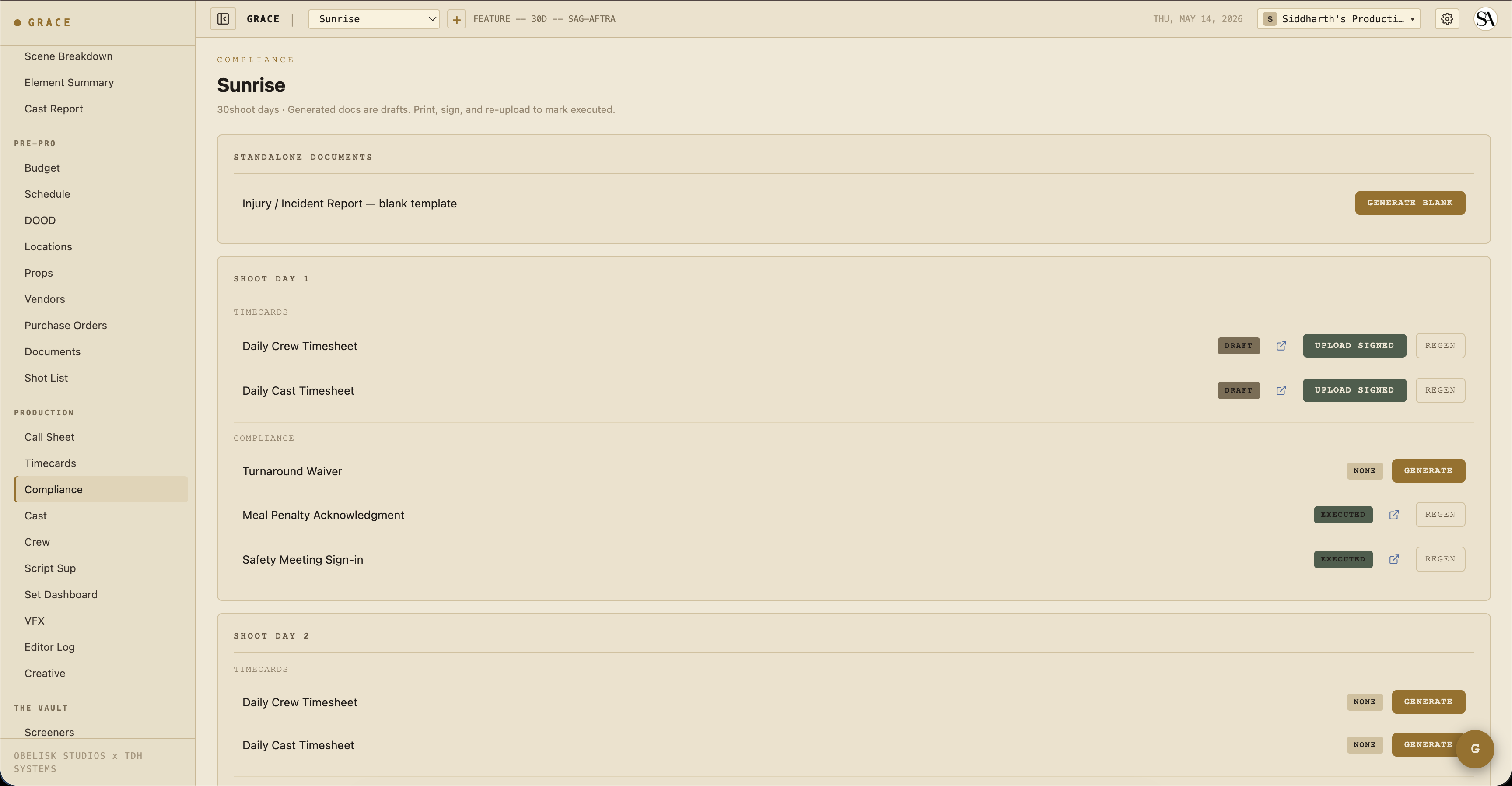
The page is organized into three parts:
- Standalone documents - the blank Injury / Incident Report template, generated with GENERATE BLANK (not tied to any day).
- Per shoot day - each day has a TIMECARDS block (Daily Crew Timesheet, Daily Cast Timesheet) and a COMPLIANCE block (Turnaround Waiver, Meal Penalty Acknowledgment, Safety Meeting Sign-in, and the Studio Teacher Daily Report when minors are on call that day).
- Exhibit G (one per minor) - inside a day's section, one Exhibit G line appears for each minor cast member on call that day.
Row actions
Each document line carries a status badge plus the actions that apply to its current state:
- Status -
none/draft/pending signature/executed/expired/superseded. - GENERATE - build the draft PDF for that day (shown when the status is
none). - Open (external-link icon) - view the current PDF in a new tab.
- SEND FOR SIGNATURE - route a
draftout for e-signature via Documenso (T1 only, see below). - UPLOAD SIGNED - replace the draft with the physically-signed copy, which flips the status to
executed. - REGEN - rebuild the draft from the latest data (shown once a draft exists).
When a document is out for signature (pending signature), the row also shows a live signer-progress readout, a refresh (arrow) button that syncs status from Documenso, and a REMIND button that nudges anyone who has not signed yet.
The document types
Each type is a generator that builds a formatted PDF on demand. None of them auto-generate from day events; you click GENERATE when you need one.
Exhibit G
The SAG-AFTRA Minor's Daily Time Sheet. Grace generates one Exhibit G per minor cast member per day (the line only appears for cast flagged as minors on that day's call). It pulls the day's call time and lays out school hours, set hours, rest, and work totals for that child performer. Adult cast hours live on the Daily Cast Timesheet, not on Exhibit G.
Turnaround Waiver
Generated on demand for a day where crew or cast waived their rest period. The PDF lists the roles that waived and the gap against the required turnaround (for example, "9.5h turnaround vs 12h required"). Note: when you approve a call sheet with a short turnaround, Grace separately auto-drafts a Forced Call memo, that memo and this waiver are distinct documents.
Meal Penalty Acknowledgment
Generated on demand to record penalty units accrued on a day and which cast and crew were affected. Separately, approving a call sheet logs the penalty cost to the budget's meal-penalty line for that day, that budget cascade is automatic; this acknowledgment PDF is not.
Studio Teacher Report
The Studio Teacher Daily Report, offered per day when minor cast are on the call sheet. Generated on demand. Tracks school hours, set hours, work hours, and rest periods per minor.
Injury Report
A standalone blank template. Click GENERATE BLANK in the Standalone Documents section to produce a printable incident form. (A richer in-app data-entry form is on the roadmap.)
Safety Meeting
The Safety Meeting sign-in sheet, generated on demand per day. This is separate from the Set Dashboard's MARK MEETING DONE control, which only writes a shared "meeting done" marker that everyone on the production sees. Generate this PDF when you need a physical sign-in sheet with initials.
Daily Crew Timesheet
Generated on demand from the timecard entries for the day. The PDF mirrors what is on the timecards screen: actuals where present, Grace prefills in italic grey where they are not.
Daily Cast Timesheet
Same as above but for cast (arrived, makeup-in, on-set, meal-out, meal-in, wrap, dismissed flow).
E-signature (Documenso)
Any draft compliance document can be routed for e-signature instead of ink-on-paper. This runs on Documenso, Grace's self-hosted signing service.
Click SEND FOR SIGNATURE on a draft to open the signature composer. You see the real PDF and place fields (signature, date, name, initials, or a free-text box) exactly where they belong, then assign each field to a recipient from the cast/crew roster. Sending routes the document through Documenso and moves it to pending signature; recipients get an email with a signing link. Back on the dashboard you can refresh the signer status or hit REMIND for anyone still outstanding. When everyone signs, the document flips to executed.
The same rail powers uploaded deal memos and contracts, and the in-app Generate feature for the eight standard forms (crew and cast deal memos, cast talent release, NDA, and the location, appearance, personal, and crowd releases). An executed deal memo flips its roster row and that person's budget line green.
Sending is limited to T1 roles (owner, producer, UPM). And to be clear: Grace never signs for you, it only collects real signatures from the people you assign.
Compliance profiles
Each production has a unionStatus that determines its compliance profile. The turnaround and first-meal thresholds are per-union; the minor daily cap is currently 9.5 hours across every profile.
| Union status | Turnaround | First meal | Minor daily cap |
|---|---|---|---|
| IATSE | 12 hr | 6 hr | 9.5 hr |
| DGA | 11 hr | 6 hr | 9.5 hr |
| SAG-AFTRA | 12 hr | 6 hr | 9.5 hr |
| Teamsters | 10 hr | 6 hr | 9.5 hr |
| Non-union | 10 hr | 5 hr | 9.5 hr |
| Mixed | IATSE (strictest) | IATSE | IATSE |
Overtime is not a per-union threshold. On the timecard, OT is computed flat: any hours worked beyond 10 in a day count as overtime.
French hours
When a production runs French hours for a day, meal penalty checks are suppressed for that day. Flag this on the call sheet (French hours checkbox before approve). Crew grazes continuously and no formal meal break is required.
Minor hours
Minor cast (under 18) have a stricter daily-hour cap. Grace validates each minor's day against:
- Earliest call - when they are scheduled to arrive (call sheet general call plus HMU chain).
- Day wrap - projected wrap from the day clock.
- Profile cap - the union profile's minor daily cap (currently 9.5 hours across all profiles).
Approve is blocked when a minor exceeds the cap. The AD can either:
- Restructure the day to come under the cap.
- Acknowledge the violation and approve anyway. The override is recorded with your user ID and timestamp for audit.
Timecards
/dashboard/production/timecards. Per-day, per-crew/cast entries with actual times.
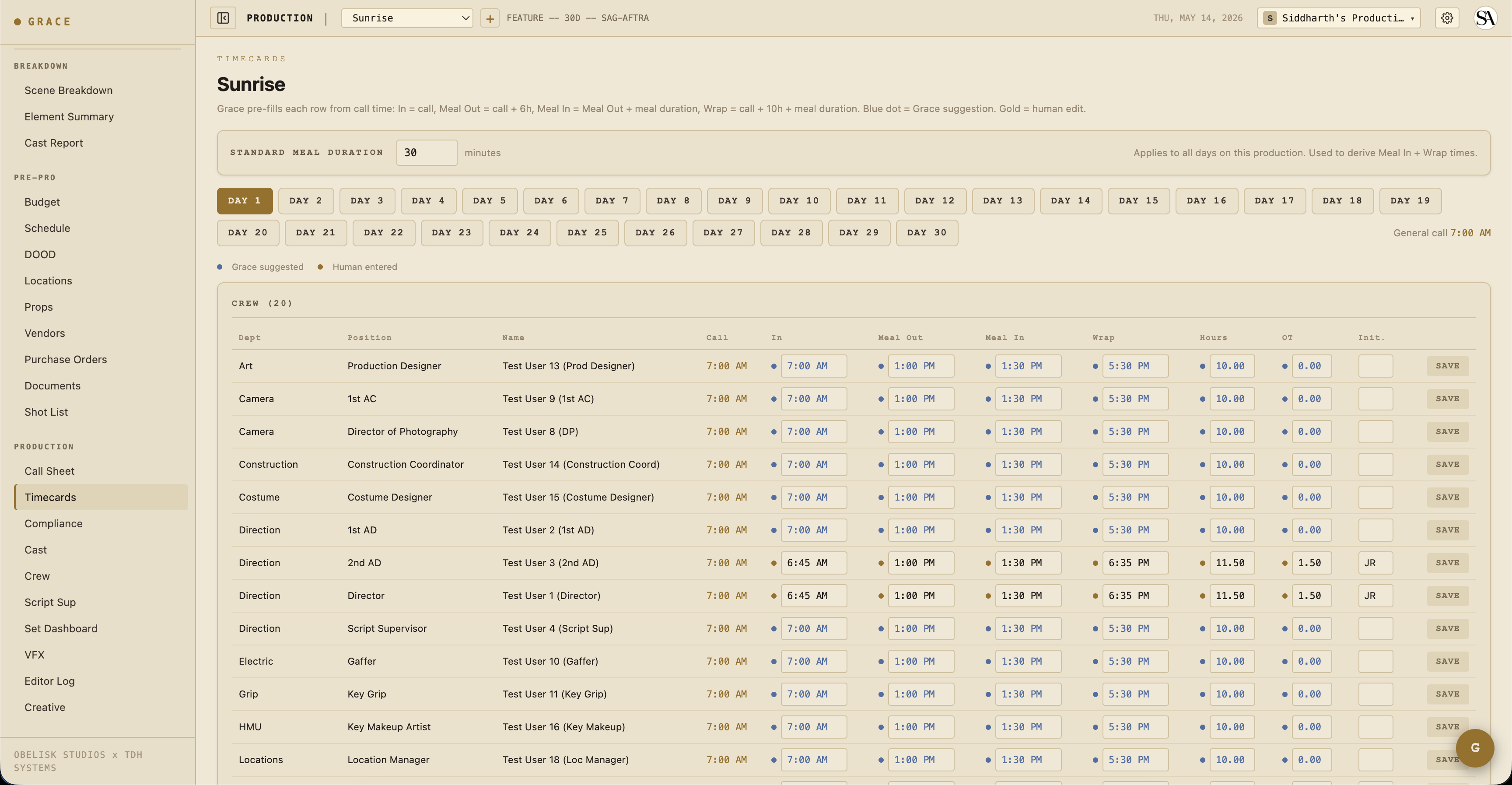
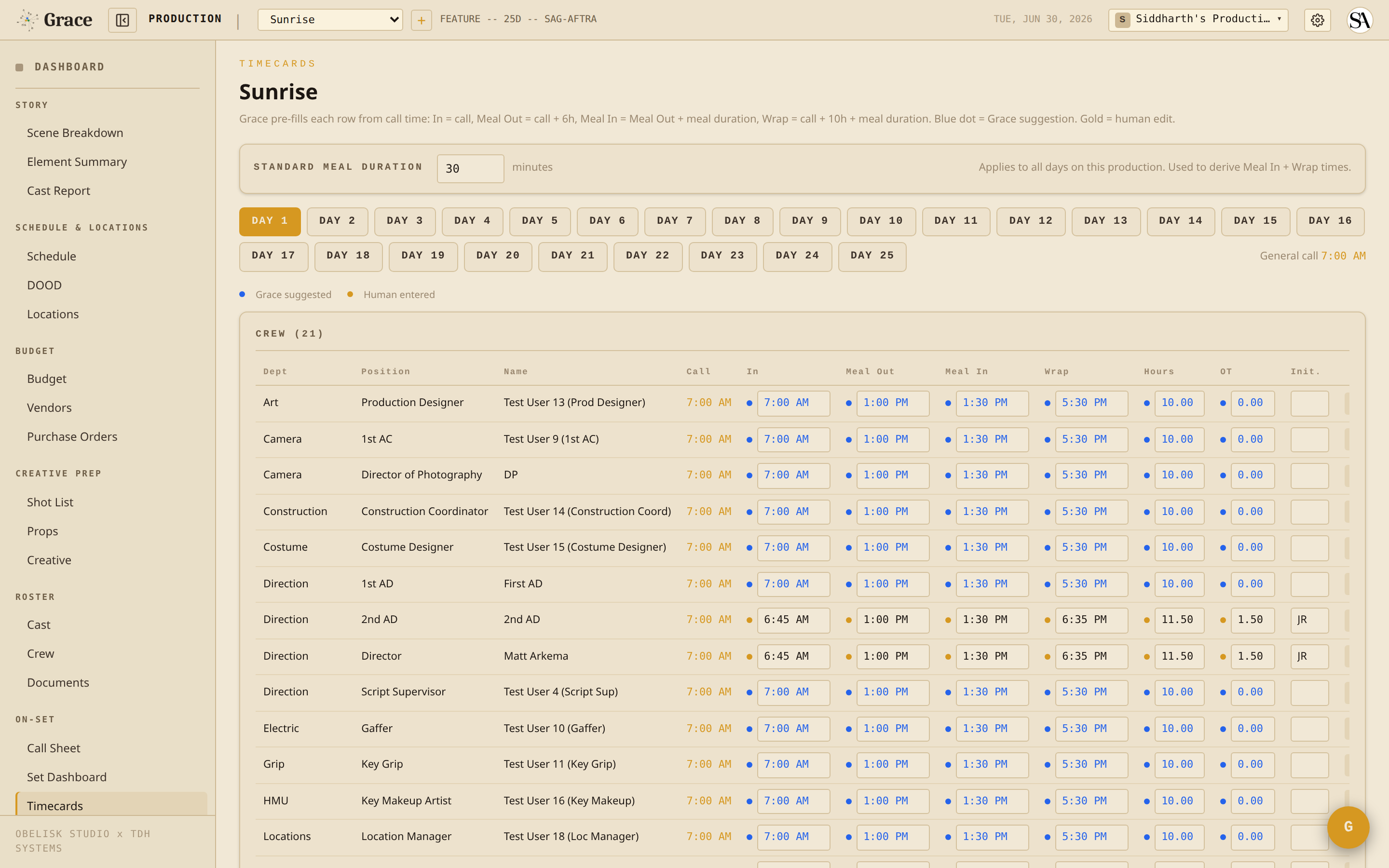
Each cell shows two states:
- Blue dot + blue text - Grace's prefill from the day's call and meal duration. The math: in = call, meal out = call + 6h, meal in = meal out + meal duration, wrap = call + 10h + meal duration.
- Gold dot + bold black text - a human override. The AD typed this in.
Typing into a blue field turns it gold. Clearing a field reverts it to blue (Grace re-suggests). Grace stores only the human overrides, the suggestions are recalculated each time from the production's meal duration setting.
The cast timesheet follows the same convention across its own columns.
The PDF that ships to the UPM or accountant mirrors the same convention: overrides in bold monospace, Grace fallbacks in italic grey.
Workflow summary
Daily, the AD's compliance loop is:
- Build tomorrow's call sheet, check for compliance flags.
- If there is a short turnaround, either restructure or approve (the Forced Call memo auto-drafts on approve). Generate the Turnaround Waiver when someone waives.
- If a minor exceeds the hour cap, restructure or acknowledge (override logged).
- Run the day on the Set Dashboard, meal timer and OT clock live.
- After wrap, capture timecards on the timecards page.
- Generate the day's timesheets and any compliance docs you need, then print, sign (or send for e-signature), and upload the executed copies.
Next
- Timecards reference - the dot system plus Grace prefill math.
- Compliance documents reference - full per-type reference.