Editor log
/dashboard/production/editor-log. The editor's handoff view - every circled take in the production, organized by scene → shot → take, with linked dailies clips. Exportable as EDL, FCPXML, CSV, or PDF for import into the editor's NLE.
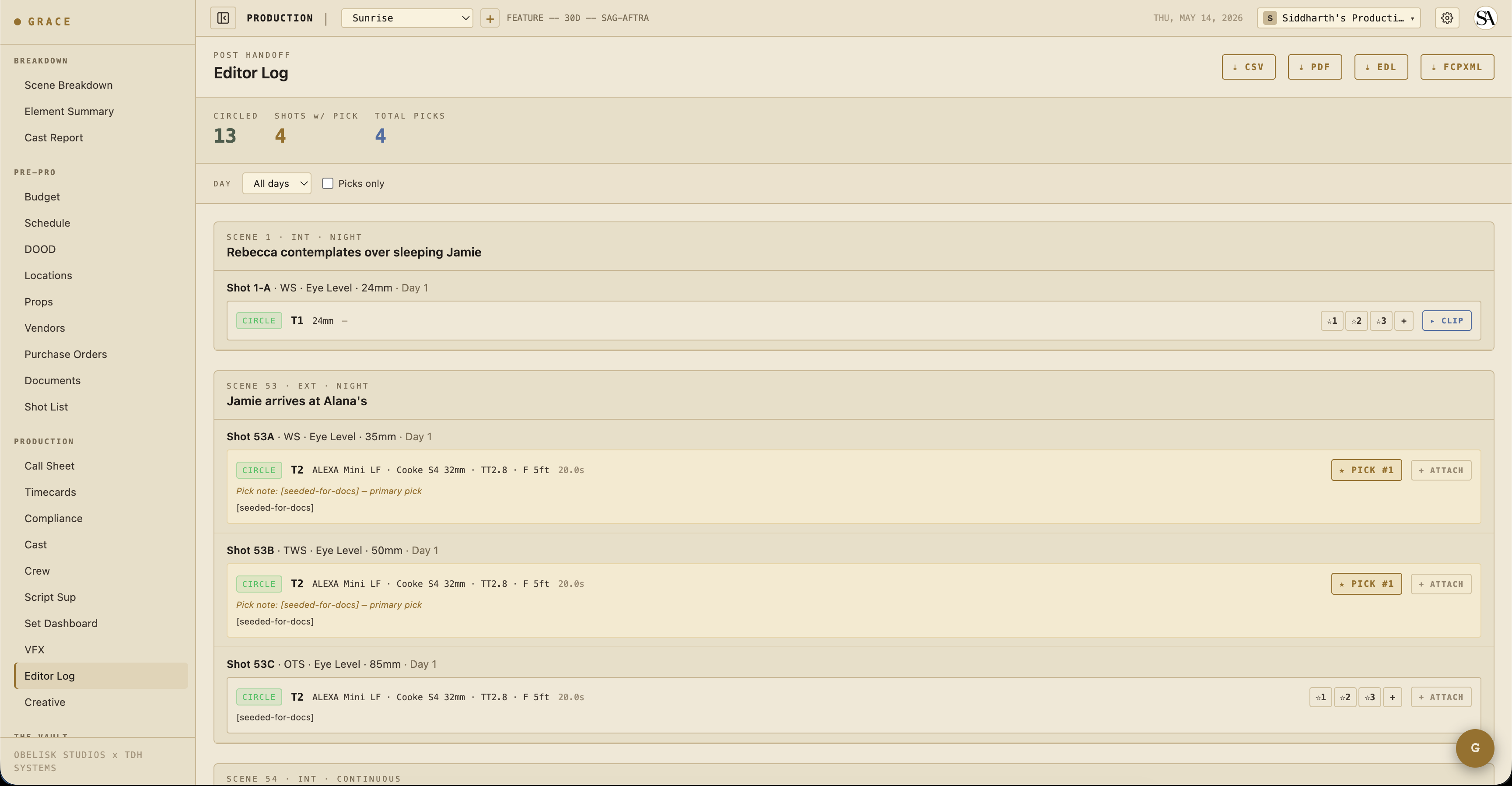
On first visit the page runs a short in-product spotlight tour (the export buttons, the filters, the scene tree, picks, and the attach-clip action). Replay it any time from the gear menu's "Show guide." The written guide here is a companion to that in-app walkthrough.
What's shown
At the top, a three-number summary bar gives the at-a-glance handoff counts: CIRCLED (green, total circled takes), SHOTS w/ PICK (gold, shots that carry at least one director pick), and TOTAL PICKS (blue).
Below it, every scene that has at least one circled take expands to show:
- Shot rows - per shot, with its takes.
- Take rows - the circled takes, each with its camera report data (camera body, lens, t-stop, focus, duration). The filter used and the exact recording timestamp are captured too, but they appear in the CSV export rather than in the on-screen row.
- Director picks - primary pick + any ranked alternates.
- Dailies clip - if the DIT has delivered the day's dailies, the linked clip streams inline. Otherwise the raw media file name shows.
Filters
Two controls in the page header scope the view:
- Shoot day - dropdown; narrow to a single day, or leave on "All days."
- Picks only - checkbox; hide everything except director-picked takes.
The view is inherently circled-takes-only. There is no in-app way to surface hold, NG, or false-start takes here (those live on the Script supervisor page). "Picks only" narrows the circled set further, down to just the director's selects.
Attaching a dailies clip
Each take shows whichever dailies clip it is linked to, and lets the editor change that link by hand. On a take with no clip, click + ATTACH to open the clip picker, choose a dailies package and the specific clip, and bind it to the take. DETACH CLIP unbinds it again. This is what controls whether the clip streams inline on that take, and what the exports reference for it.
Cross-version
The editor log is cross-shot-list-version by design (4.5a fix). It does NOT filter by shot list version because takes are production-scoped physical media. If you fork the shot list mid-production (e.g., add additional inserts on a revision), the editor log still surfaces all circled takes across all shot list versions for the same scene.
Per-shot shoot day
The day a shot was captured is stamped at the take itself (when the Script Sup logs the take), not derived from the schedule. This way, even if the schedule changed after a shot was captured, the editor log still reflects when it actually rolled.
Exports
From the editor log page, there are four export buttons. Each export respects the current Shoot day and Picks only filters, so what you export mirrors what is on screen.
CSV
Flat per-take spreadsheet with all fields (including the filter and recording timestamp that the on-screen row omits). Easy to import into Excel, Google Sheets, or scripts.
Print-friendly version of the on-screen view. Goes to the editor or to lab transfer.
EDL
CMX 3600-style edit decision list. This export is built from the director picks only, in rank order, so you must mark at least one pick first. With no picks marked, the export returns a "No director picks to export" error rather than an empty EDL.
Paper cut only - record timecode is synthesized starting from 01:00:00:00, source timecode runs 00:00:00:00 → duration per clip. Reel name is the dailies file name. A comment line at the top marks it as a paper cut so the editor knows to relink against real dailies on import.
This is intentional: Grace doesn't capture source timecode from the camera (4K cameras don't all expose TC). The EDL is a "here's the structure of what got picked" handoff. The actual conform happens in Avid / Premiere / Resolve after media is online.
FCPXML
Final Cut Pro XML. Like the EDL, it exports the director picks only and returns the same "No director picks to export" error when none are marked. Offline-structure-only: one asset per unique dailies clip referenced by the picked takes, with local-file references. Imports as a sequence with red placeholders that the editor relinks against the real dailies. Same paper-cut intent as EDL.
Why no AAF?
AAF (Advanced Authoring Format, Avid's interchange) requires specialized tooling to write properly. It's on the roadmap. In the meantime CSV + PDF + EDL + FCPXML cover the major NLE import paths.
Director picks → editor log
When the director marks a take as a "select" via Script Sup picks, it appears in the editor log with a small icon indicator + rank. Useful for the editor to know which take to start cutting from when multiple takes are circled. Marking picks is also what unlocks the EDL and FCPXML exports (both are picks-only).
What flows in here
- Takes from the Script supervisor workflow
- Picks from the same workflow
- Dailies clips from the Vault DIT pipeline
The editor log is the convergence point - everything captured during the shoot funnels here for handoff to post.
Mobile
The page works on mobile but at a tighter density. Realistic use is desktop at end-of-day for the editor.
Next
- Vault - where the dailies clips themselves live + how they get delivered.